Contentful Vs. WordPress: The Best CMS In 2026
Choosing between WordPress and Contentful isn't about which is better. It's about which is built for how your team actually works.
If you're evaluating Contentful and WordPress for your website, you're facing one of the most difficult CMS decisions. Not because either platform is bad, but because they're built on fundamentally different assumptions about how content should work.
WordPress powers 43% of all websites on the internet and is the default choice for most of the web. Contentful powers roughly 30% of the Fortune 500. G2 complaints for each are strikingly different: WordPress users gripe about plugin bloat and security overhead; Contentful users cite steep learning curves and pricing that jumps sharply once you outgrow the free tier.
Those aren't random complaints. They reflect a real difference in who each platform is built for.
This guide is for developers, content leads, and marketing teams deciding between the two. We'll break down architecture, ease of use, SEO, pricing, and real-world use cases so you can make a confident call.
What Makes Contentful & WordPress So Different?
Before diving into specifics, it's worth understanding why this comparison is so tricky.
Most comparisons pit two products in the same category against each other. This one doesn't.
- WordPress is a traditional, coupled CMS: your content and its visual presentation live together in a single system.
- Contentful is headless and API-first: content lives in a structured backend, and a separately built front-end pulls that content via API to display it however, and wherever, it needs to appear.
That architectural difference isn't just a technical detail. It reshapes pricing, the editorial experience, SEO workflows, and the timeline from "we chose a CMS" to "we published something."
Keep that distinction in mind as we go, because it explains almost every trade-off in this comparison.
Architecture: Headless CMS Vs. Traditional CMS
Think of a traditional CMS like a full-service restaurant: the kitchen and the dining room are in the same building. You walk in, the food gets prepared, and it gets served right there in a format the restaurant controls.
A headless CMS is more like a ghost kitchen. The food (your content) gets prepared in a central location, then delivered via API to wherever it's needed: your website, your mobile app, your kiosk display, your connected car experience. That single distinction drives almost every trade-off in this comparison.
WordPress: Content and presentation, together
WordPress couples your content and its visual output in a single system. You write a post, choose a theme, and WordPress handles both the storage and the rendering. There's no API to wire up, no separate front-end to build, no deployment pipeline to configure.
It's fast to get started with and deeply familiar to most web teams. WordPress can be configured to run headlessly using its REST API or the WPGraphQL plugin, but headless is not its native mode. Getting there requires meaningful extra setup, and it's an architectural option, not a default.
Contentful: Content as a service
Contentful decouples content from presentation entirely. Content lives in a structured backend. A front-end built in React, Next.js, or any modern framework pulls that content via REST or GraphQL API and handles rendering independently.
For developers, this is genuinely exciting: full control over the front-end, no theme constraints, and the ability to push the same structured content to multiple surfaces simultaneously. For content editors, the trade-off is that no visual preview exists until a developer builds one. That's a real lead-time and cost consideration.
The industry trend lines favor the headless approach at scale. According to WP Engine's State of Headless 2024, 73% of businesses now use headless architecture, up from roughly 33% in 2019.
Bottom line
If you need one website live quickly, WordPress' coupled architecture is a feature. If you need to serve structured content across multiple front-ends simultaneously, Contentful's decoupled model is the right foundation.
Ease Of Use & The Content Editing Experience
This is the section that matters most to the people who will actually live inside whichever platform your team chooses. Developers make the CMS decision; editors deal with the consequences.
WordPress: Visual, familiar, and fast to learn
A non-technical user can install WordPress, pick a theme, and publish their first piece of content within a few hours. The Gutenberg block editor is intuitive enough that most editors pick it up without training.
One G2 reviewer put it plainly:
"WordPress combines low entry barriers with enterprise-grade scalability. The intuitive Gutenberg editor lets non-technical staff publish content fast."
User roles (Administrator, Editor, Author, Contributor), comment moderation, and scheduling are all built in.
Contentful: Structured, powerful, and harder to onboard
Instead of a visual page builder, Contentful editors work within a structured content model: predefined fields for a title, a body, an author, a featured image, and so on.
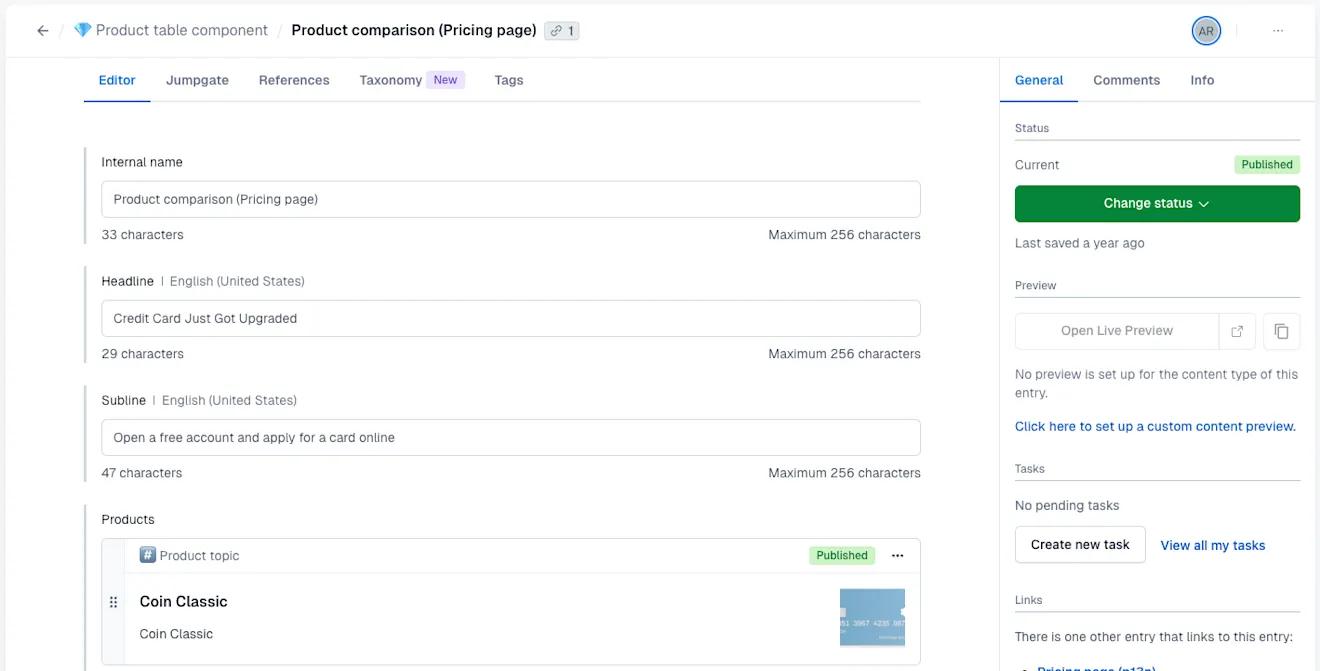
This approach is powerful for content consistency and omnichannel delivery, but it can feel abstract to editors who expect to see their content laid out visually as they type. "It is not particularly intuitive. The learning curve is steep," wrote one G2 reviewer.
A Capterra reviewer describes it best:
"Unlike WordPress, where you can see the overall structure of your page elements clearly on an overview page, you can only see the rows of the page on the overview in Contentful... Overall, I find Contentful terrible to use."
Those are strong words, and they reflect a real pattern. Contentful has a 4.3-star G2 rating overall, but the negative reviews cluster consistently around editors who expected a visual experience and didn't get one.
⚠️ Important note: with Contentful, a developer needs to build the front-end before editors can see anything rendered at all. This can add weeks to your launch runway.
Where Contentful does pull ahead is in enterprise collaboration. Configurable workflow states, audit logs, and environment management make it well-suited for large teams handling content governance across multiple brands or regions (things WordPress' native role system wasn't designed to handle at that scale).
Bottom line
If your content team is non-technical and needs to publish independently, WordPress is the clear winner. If your organization prioritizes structured content governance and has engineering support in place, Contentful's editorial model pays off over time.
SEO & Performance: Which Platform Ranks Better?
On SEO, the two platforms aren't close. WordPress gives non-technical editors full control on day one. Contentful makes you build that control from scratch. Which approach wins depends entirely on how much engineering capacity you have, and how much you're willing to spend on it.
WordPress: SEO out of the box, no developer required
WordPress' plugin ecosystem puts powerful SEO tools in the hands of non-technical editors.
Yoast SEO alone powers more than 13 million websites and has accumulated over 463 million all-time downloads. Rank Math has more than 4 million active installations and offers schema markup, redirect management, and Google Search Console integration (much of it free).
A content editor can manage meta titles, descriptions, canonical tags, structured data, and XML sitemaps without touching a single line of code.
WordPress performance has mixed results. According to CrUX data analyzed by corewebvitals.io, roughly 44% of WordPress mobile sites pass all three Core Web Vitals. DigitalApplied's 2026 page speed analysis puts the average WordPress page load time at 3.4 seconds.
A bloated setup on shared hosting with 50 active plugins will drag those numbers down. A lean plugin stack on a managed host like Kinsta or WP Engine with a caching layer can get you much closer to competitive scores.
Contentful: SEO you build yourself, performance you control
Contentful has no native SEO features. Every meta tag, OG tag, canonical URL, JSON-LD schema markup, XML sitemap, and redirect must be modeled in your content types and emitted by your front-end code.
For teams without strong engineering capacity, that can be a big hidden time commitment (and extra cost in developer time).
Contentful’s upside is performance. A Contentful-powered front-end built on Next.js and deployed to a host like Vercel or Netlify will almost always outperform a typical WordPress setup.
DigitalApplied's analysis puts average Next.js page load time at 0.8 seconds and its mobile Core Web Vitals pass rate at 58%, compared to WordPress' 3.4-second average load and 44% pass rate. WP Engine's research found fewer than 30% of WordPress sites have optimal Core Web Vitals scores.
Bottom line
WordPress wins on SEO accessibility for non-technical teams. Contentful wins on raw performance potential, but only if your engineering team builds it right. Neither platform guarantees good search performance on autopilot.
Pricing: What Will Each CMS Actually Cost You?
WordPress is technically free. Contentful has a free tier. Neither of those facts tells you what you'll actually spend. Here's what the numbers look like.
WordPress: free software, real-world costs
WordPress core is free to download and install. The costs add up immediately after.
Hosting alone runs $30 to $80 per month on a managed platform (Kinsta, WP Engine, Cloudways) for a typical business site, rising to $100 to $200 per month for high-traffic or eCommerce deployments. A realistic premium plugin stack (a page builder, an SEO tool, a form plugin, security, and backups) adds $600 to $1,800 per year.
MigrateLab's 2026 cost breakdown estimates keeping a serious WordPress business site running costs $1,200 to $2,400 per year before any development work. Add a monthly maintenance retainer, and that figure climbs quickly. For enterprise needs, WordPress VIP starts at around $2,000 per month.
Contentful: predictable tiers with a steep jump after free
Contentful uses SaaS pricing that changed significantly in April, 2025. As documented by Watermark Agency and confirmed by Contentful's own pricing page, the free tier was meaningfully scaled back, with no grandfathering for existing users.
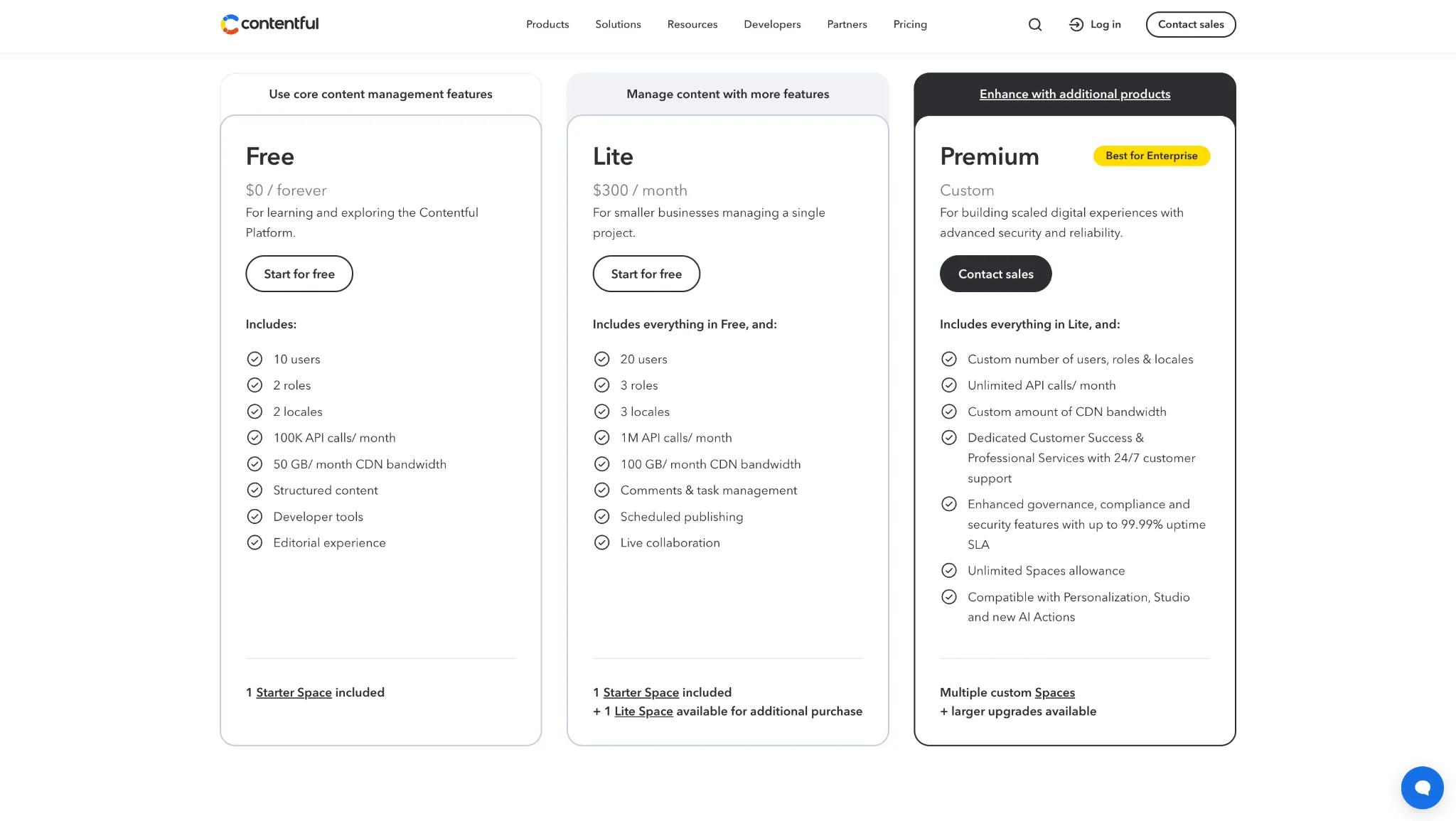
According to Vendr, the median annual Contentful contract sits around $53,000. Enterprise deployments can reach $150,000 or more annually. The gap between free and the first paid tier is a big pain point for growing teams.
Bottom line
WordPress gives you lower and more predictable entry costs, with overhead that scales as you add plugins and infrastructure. Contentful's free tier works for prototyping, but real usage typically hits the Lite threshold quickly, making it $3,600 per year before front-end hosting or developer time.
For large teams managing content at scale, Contentful's reduced maintenance burden can offset the premium. For everyone else, the math usually favors WordPress.
Final Verdict: Which CMS Is Right For Your Team?
Here's a framework for picking which CMS is best for you.
Choose WordPress if...
- You're a blogger, small business, or marketing-led team that needs to publish quickly without a developer in the loop
- SEO control and a plug-and-play plugin ecosystem are non-negotiable priorities
- Your content team expects a visual, familiar editing interface
- Your content primarily lives on one website rather than multiple channels or apps
- Budget is a real constraint and you need predictable, low monthly costs
- You need to be live and publishing within a matter of weeks
Choose Contentful if...
- You're building a multi-channel digital product that serves content to a website, a mobile app, and other places simultaneously
- You have an engineering team comfortable with API-driven architectures and modern front-end frameworks like Next.js
- Your content requires strict structural consistency across a large volume of entries, think global product catalogs, multi-locale publishing, or enterprise brand content
- You're managing content for multiple brands or properties from a single backend
- You're willing to invest upfront in a custom front-end in exchange for long-term editorial consistency and infrastructure reliability
One More Piece Of The Puzzle
Whichever platform you choose, there's one workflow problem neither solves by default: content gets written in Google Docs or Word, then manually copied into the CMS, reformatted, and republished. That manual copy-paste time adds up fast.
BlogSync cuts it out entirely. BlogSync lets your team publish from Google Docs, Word, or Notion directly to Contentful or WordPress, with formatting intact, clean HTML added, and images optimized. The right CMS is the foundation. A clean publishing workflow is what keeps content moving.
Try BlogSync for free here!