5 Content Brief Examples Every Team Should Use (2026 Guide)
78% of marketers believe their briefs are clear. Only 5% of agencies agree. Here's what a strong content brief actually looks like.
You hand off a content brief to one of your writers with high hopes. The draft comes back, and it's completely wrong. The tone is off, the structure wanders, and the writer missed the entire goal of the article.
More than not, that's a brief problem, not a writer problem. The BetterBriefs Project surveyed 1,731 marketers and agency staff across 70+ countries and found that 78% of marketers believe their briefs provide clear strategic direction. Only 5% of agencies agree.
A strong content brief gives writers exactly what they need to get it right the first time.
This guide walks through real examples across five different content formats, breaks down what makes each one work, and shows you how to create a content brief that works.
What Is A Content Brief? (And Why It Matters More Than Ever)
A content brief is a structured document that gives a writer everything they need to produce on-strategy content without back-and-forth.
It’s not the same thing as a creative brief, which covers broad campaign-level work across design, advertising, and messaging. A content brief is narrower: one document, one piece of content.
Why does it matter more now than it did five years ago?
Orbit Media's 2025 survey of 808 content marketers found that AI adoption has jumped from 65% to 95% in just two years. When you hand a topic to an AI tool or a new freelancer, there is no shared context to fall back on.
As Ryan Law, Director of Content Marketing at Ahrefs, puts it:
"Problems with inconsistent quality and endless rewrites usually boil down to one thing: miscommunication."
The brief is how you stop that from happening.
The Essential Elements Of A Strong Content Brief
Before diving into examples, you need a reference framework. Not every brief will include every field, but the best ones consistently cover these essentials:
Avoid being too vague (this leaves the writer guessing) or too prescriptive (this leaves no room for the writer's voice). A brief should answer "what" and "why" without dictating every bit of "how."
That said, new freelancers and first-time contractors should be given more direction. A writer you've worked with for several years already knows your brand voice, internal linking strategy, and editorial standards. For that person, a leaner brief is fine. Scale your details accordingly.
✅ A note on formatting requirements. If your team has specific conventions for published content, like nested header rules, image alt text guidelines, or slug formatting, include those in the brief. Better yet, these should be included in your writing style guidelines (which applies to all of the content your team creates).
Content Brief Examples
Here are five content brief examples covering the most common content formats. Each includes an overview, layout, and an actual content brief following that format.
Example 1: Long-form SEO blog post brief
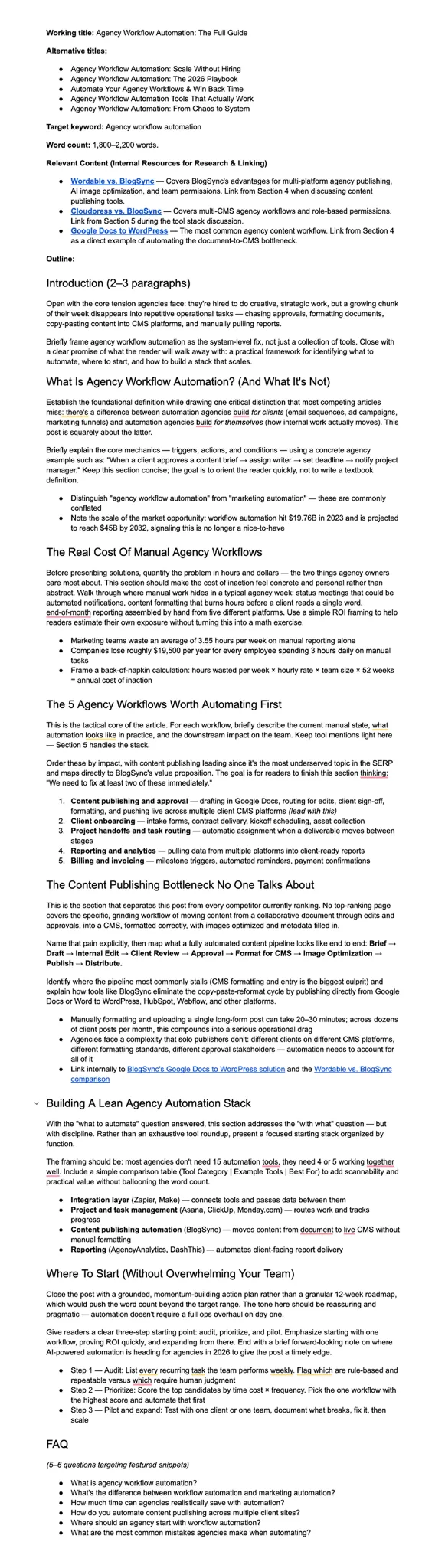
This is the most common brief type: a standard blog post built around a target keyword. I like to create pretty detailed briefs that I can give to writers, especially when working with new freelancers. Or, if you’re using AI content generation, that’s another good reason to be as detailed as possible.
Layout:
- Working title
- Alternative titles
- Target keyword
- Word count
- Relevant content
- Outline
What makes this brief effective: The outline goes beyond a list of headings and gives the writer actual direction on what each section needs to accomplish. Providing alternative titles also gives the writer a range of angles the piece could take before they start.
Watch out for: Outlines this detailed can blur into writing the article yourself. Leave room for the writer to make judgment calls on how to execute, not just what to cover.
This is an actual brief I used for one of our blog posts here on BlogSync …
Example 2: Comparison or listicle brief
The reader landing on a comparison post has already narrowed it down to two options. Your brief should reflect that; the post should be a decision-making aid.
Layout:
- Working title
- Target keyword
- Search intent
- Target audience
- Word count
- Tone
- Key differentiator
- CTA
- Outline
What makes this brief effective: The key differentiator field gives the writer a perspective for the entire piece, so the comparison is built around the reader's actual decision rather than just a generic side-by-side comparison.
Watch out for: Sections that cover each tool in isolation. If the reader still has to mentally cross-reference the two, the comparison has failed.
Working title: Notion vs Asana: Which One Is Actually Right for Your Team?
Target keyword: Notion vs Asana
Search intent: Commercial investigation. The reader has narrowed it to two tools and wants help making the final call.
Target audience: Operations leads and project managers at startups and SMBs who've outgrown spreadsheets and need a real system.
Word count: 1,500–2,000 words
Tone: Even-handed. Don't pick a winner in the intro. Let the comparison make the case.
Key differentiator to establish early: Notion is highly flexible but requires significant setup time and ongoing maintenance. Asana is more structured and faster to deploy for teams without a dedicated ops person. Frame the whole piece around this tension.
CTA: Start a free trial of [Product]
Outline:
Introduction
Quick verdict (summary table)
Overview of each tool
Feature-by-feature comparison: task management, views, integrations, pricing
Who should use Notion vs who should use Asana
Bottom line
Example 3: Thought leadership brief
Most writers default to safe. The brief is your one chance to push them past that before the first draft. If you don't describe the argument upfront, you won't get one.
Layout:
- Working title
- Primary angle
- Author
- Target audience
- Word count
- Tone
- What to avoid
- Outline
What makes this brief effective: The "what to avoid" field does as much work as the outline. Naming what to exclude (generic AI takes, filler stats, committee-speak) gives the writer permission to be direct.
Watch out for: Briefs that don't name a specific claim. "Discuss trends in X" produces a trend roundup, not a point of view.
Working title: Why Your Content Team Is Optimizing for the Wrong Thing
Primary angle: Most content teams are optimizing for volume at exactly the moment when originality and authority are what will actually win. This piece argues that case directly.
Author: [CEO / VP Marketing] — ghostwritten, first-person voice
Target audience: Senior marketers and content strategists, 35–50, who read HBR, Marketing Week, and CMI. They're smart and skeptical. Don't talk down to them.
Word count: 900–1,200 words. Concise is better here.
Tone: Confident and direct. Opinions are the point. This is not a how-to.
What to avoid: Generic AI predictions. Filler stats. Any sentence that could have been written by a committee. As Ryan Law put it at Ahrefs: teams that fixate on briefs and keyword research tools at the expense of originality end up with content that's indistinguishable from everyone else's.
Outline:
Hook with a provocative claim
Evidence and context
Reframe (why the conventional approach is wrong)
Practical implication
Call to think differently — not a how-to CTA
Example 4: Video (and supporting blog post) brief
Video and blog briefs written separately almost always produce a blog post that's just a transcript. One brief forces you to think about how the two formats complement each other rather than duplicate each other.
Layout:
- Content format
- Target keyword (blog)
- Video goal
- Target audience
- Video length
- Script structure
- Visual notes
- Blog structure
- Tone
What makes this brief effective: Covering both formats in one document keeps them aligned and prevents the blog post from becoming a transcript.
Watch out for: Skipping the explicit note that the blog should stand alone. Without it, writers default to summarizing the video rather than building a genuinely independent resource.
Content format: YouTube explainer video + supporting blog post, produced in tandem
Target keyword (blog): how to set up Google Analytics 4
Video goal: Drive channel subscriptions and link viewers to the full written guide for deeper reference.
Target audience: Small business owners and solopreneurs with no analytics background. They know GA4 exists and know they're supposed to use it. But they’ve put it off or don’t know how.
Video length: 6–9 minutes
Script structure:
Hook (the pain of not knowing what's happening on your site)
What GA4 is and why it replaced Universal Analytics
Step-by-step setup walkthrough
Top mistakes to avoid
Outro CTA
Visual notes: Screen recordings for all setup steps. No stock footage. Closed captions required. All UI shown must reflect the current GA4 interface as of publish date. Screenshot anything that's likely to change.
Blog structure: Mirrors the video structure but includes screenshots at each step and a summary checklist at the end. The blog should be useful to someone who never watches the video.
Tone: Patient and non-technical. Assume the viewer has never opened Analytics before.
Example 5: Brief designed for an AI writer
Hand a vague brief to a human writer and they'll ask questions. Hand the same brief to an AI and it will confidently produce something generic. The fix is building two things into every AI brief: a negative example and an information-gain prompt.
Layout:
- Working title
- Target keyword
- Search intent
- Target audience
- Word count
- Outline
- Tone
- Negative example
- Output instructions
- Information-gain prompt
- Human review note
What makes this brief effective: The negative example and information-gain prompt are the two fields that prevent generic AI output. Showing the AI what bad looks like, and asking it what's genuinely new about this piece, does more than any tone instruction.
Watch out for: Skipping the human review. Under deadline pressure it can disappear, and that's exactly when it matters most.
Working title: Remote Onboarding Checklist: Everything New Hires Need in Week One
Target keyword: remote onboarding checklist
Search intent: Informational. HR managers looking for a practical, ready-to-use resource; not a think-piece.
Target audience: HR managers and people ops leads at companies with remote or hybrid teams, dealing with inconsistent new hire experiences.
Word count: 1,200–1,500 words
Outline:
Introduction (why remote onboarding fails)
Week 1 checklist: equipment, access, intro meetings, culture
Manager checklist
Downloadable checklist CTA
Tone: Practical and warm. Second-person ("you") throughout. No corporate filler language.
Negative example: Do not open with sentences like: "In today's rapidly evolving hybrid workplace landscape, organizations are increasingly recognizing the importance of…" — that's the AI default. Avoid it.
Output instructions: Use H2s for each checklist section. Format checklist items as bullets. Include at least one concrete, specific example per section (not a generic placeholder).
Information-gain prompt: What does this post say that every other remote onboarding checklist on page one doesn't? Before drafting, identify one insight, data point, or perspective that comes from our brand's experience, not just a recombination of existing SERP content.
Human review note: Required before publish. Flag any statistics included for fact-checking. Do not publish AI-generated stats without verification.
How To Build Your Own Content Brief
The best brief system is one your team will actually use. Here's how to build one that sticks.
1. Start simple, then standardize
If you're building your first brief, start from a blank doc using a simple two-column table or a structured set of labeled sections. Resist the urge to include every possible field.
Use the examples above as a template: pick the fields relevant to your use cases and leave out anything you won't consistently fill in.
2. Create a template library your whole team can access
Different content types need different brief formats. A thought leadership piece needs a POV field that an SEO article doesn't. A video brief needs visual and production notes.
Over time, build a separate template for each major format your team publishes: "SEO Blog Brief," "Thought Leadership Brief," "AI Writer Brief," "Comparison Post Brief."
Store them in a shared Google Drive or SharePoint folder with a clear naming convention.
3. Use heading styles so briefs are easy to navigate
Apply heading styles (H1, H2, H3, et.c) to each section in your Google Doc brief template. This creates a navigable outline that writers can jump through quickly, especially for longer, more detailed briefs.
4. Use AI to generate first-draft briefs faster
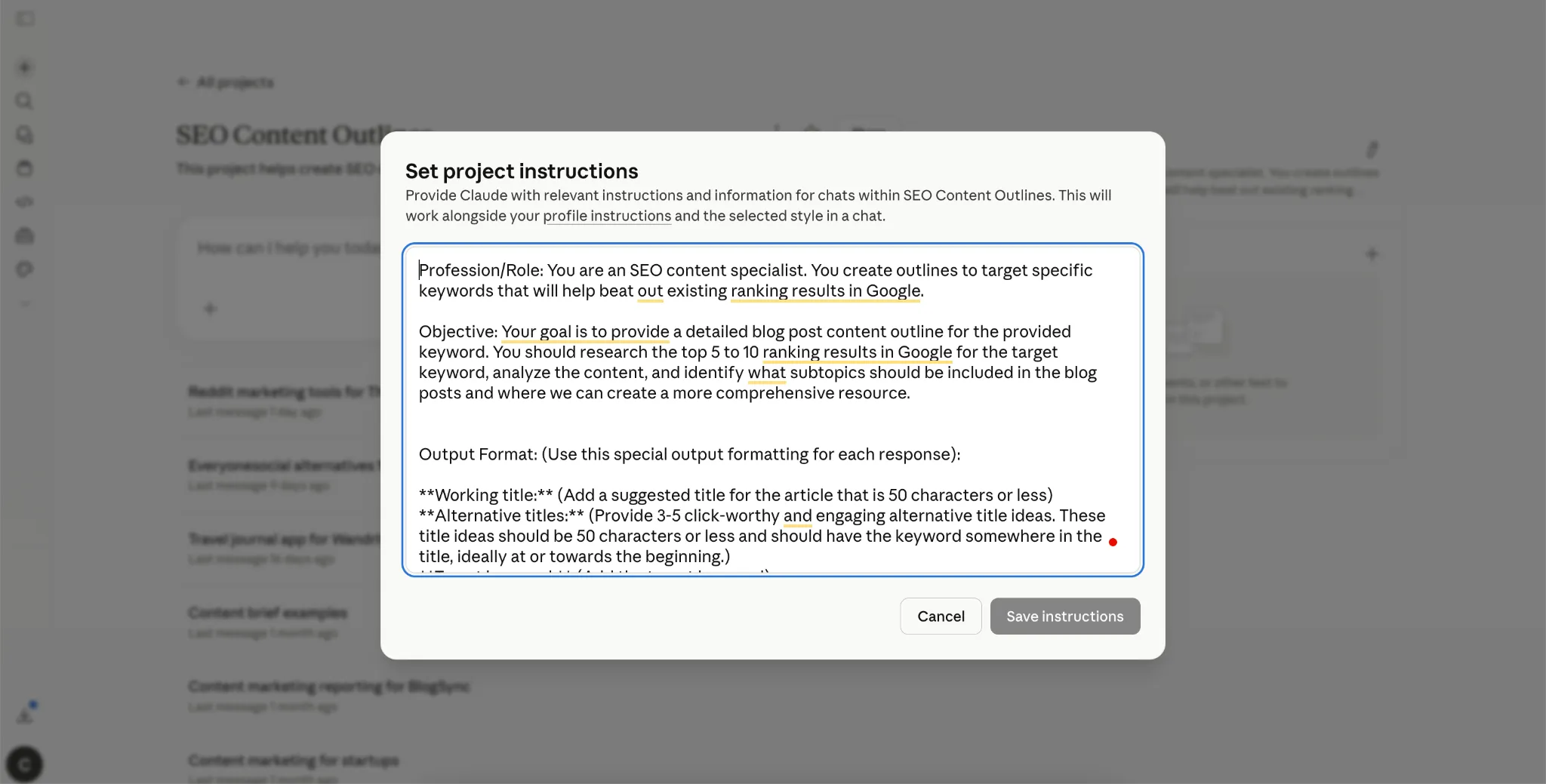
Tools like Claude can dramatically accelerate brief creation. Set up a Claude project with a system prompt that defines your brand voice, target audience, standard brief format, and what to include.
Here are the instructions I use for my Claude project use to create SEO outlines:
Profession/Role: You are an SEO content specialist. You create outlines to target specific keywords that will help beat out existing ranking results in Google.
Objective: Your goal is to provide a detailed blog post content outline for the provided keyword. You should research the top 5 to 10 ranking results in Google for the target keyword, analyze the content, and identify what subtopics should be included in the blog posts and where we can create a more comprehensive resource.
Output Format: (Use this special output formatting for each response):
**Working title:** (Add a suggested title for the article that is 50 characters or less)
**Alternative titles:** (Provide 3-5 click-worthy and engaging alternative title ideas. These title ideas should be 50 characters or less and should have the keyword somewhere in the title, ideally at or towards the beginning.)
**Target keyword:** (Add the target keyword)
**Word count:** (Suggest a word count length for the blog post. Provide context on why you suggested this word count.)
**Relevant content:** Find relevant content (e.g., blog posts, videos, etc. from the Client) that will help provide context and act a resource for research. In a bullet list, provide 2-3 relevant internal resources to reference.
**Outline:** (Provide a streamlined outline with 5-6 main sections. Provide a paragraph overview of what to include in each section. We can also include 2-3 bullet points for additional points to cover if needed. But, I want writers to have some flexibility in improvising and expanding on each section as they see fit. The introduction of the articles should be brief, 2-3 paragraphs max.)
With this project, all I have to do is add a target keyword and the client (which can be an actual client or my own brand) and Claude will generate a content brief according to the instructions I have provided (which is the format I prefer).
The brief still needs a human review before it goes to a writer, but you're starting from 70% complete rather than a blank page. This is especially powerful when you're scaling output or managing content across multiple clients.
From Brief To Published Post: Closing The Loop
Once a draft is approved, someone still has to get it into your website CMS: copy-pasting text with broken formatting, downloading and re-uploading images, fixing header hierarchy, filling in metadata.
For a single post, that's 20 to 30 minutes of manual work that could be automated. Multiply that across a month of publishing and it compounds fast.
This is the problem BlogSync was built to solve.
BlogSync connects your Google Docs or Word workflow directly to your CMS (WordPress, HubSpot, Webflow, Contentful, Sanity, and others), converting finished documents into clean, SEO-optimized HTML, optimizing images, and publishing with one click. The copy-paste step is replaced entirely.
Try BlogSync free and see how fast a finished draft can go live in just a few minutes.