How To Automate Content Publishing (2026 Guide)
Your writing is done. So why does publishing still take 30 minutes per post? Here's how to automate your content publishing process.
Your article is done, approved, and ready to be published. So why does it still feel like the hard part is ahead of you?
For most content teams, it is. Writing is only half the battle.
What follows is a slow, repetitive slog: copying text out of Google Docs into your CMS, watching the formatting break, fixing headers, downloading images one at a time, renaming them, compressing them, uploading them, adding alt text, tweaking on-page SEO details, and finally hitting publish. Then, doing it all again every single time you publish a new blog post. And that demand is only accelerating.
Adobe found that 71% of marketers expect content demand to grow more than 5X by 2027. Yet, according to Canto's State of Digital Content report, only 43% of teams have a standardized and automated content workflow. The rest are still doing it by hand.
Automating content publishing is not a luxury reserved for large enterprises or media organizations. It’s a practical, achievable workflow upgrade for any team publishing on a regular schedule, and it has never been more accessible.
Why Manual Publishing Is Costing You More Than You Think
Most content teams don’t see copy-paste publishing as a problem. It’s just what comes next after the writing is done. That mindset needs to change.
Publishing is a non-strategic, rule-based task. It follows the same steps every single time. That is exactly the type of work that should be automated.
The hidden time drain is substantial
AirOps estimates that content teams can lose up to 16 hours a week on non-creative tasks, including status updates, handoffs, formatting, and publishing logistics. McKinsey research found that 60% of employees could save roughly 30% of their working time through workflow automation. Applied to a three-person content team, that is approximately half of one person's capacity, every week, tied up in tasks that add zero creative value.
The cost compounds at the per-post level too.
A realistic manual publishing session, covering formatting cleanup, image handling, compression, renaming, re-uploading, and alt text, typically runs 20 to 30 minutes per article. Across a team publishing 16 articles a month, that is six to eight hours of labor that could be eliminated almost entirely.
A quick cost illustration:
Manual formatting introduces errors that hurt your SEO
When content travels from a Google Doc to a CMS via copy-paste, things break. Headers lose hierarchy. Inline styles from the document bleed into the HTML, creating bloated code that is hard to maintain and slow for browsers to parse. Images often lose their alt text entirely, a real problem given that SE Ranking's analysis of over a million websites found that only 26% properly use alt text on their images.
The image problem runs deeper than alt text. According to HTTP Archive data, images account for 33 to 39% of a typical page's total weight. Google's own Core Web Vitals data shows that sites meeting performance thresholds see 24% lower abandonment rates; a direct signal that unoptimized images are costing you both rankings and readers.
Single points of failure create real publication risk
When one person owns the publishing process, every vacation or sick day becomes a missed deadline. Jen Neary, Director of Content at Canto, captured the problem directly in a recent interview:
"The content bottleneck has shifted from production to operations. You can produce content faster with AI, but if your team can't find the right asset, doesn't know which version is current, or has to manually push updates across channels, you're just creating more chaos." - Jen Neary, Director of Content, Canto
That chaos has measurable consequences. Publishing inconsistency does not just frustrate your team. It actively suppresses your SEO momentum.
Orbit Media's 2025 blogging survey found that bi-weekly posting is the minimum threshold for meaningful content performance, and that publishing frequency consistently correlates with stronger results. Additionally, according to Siege Media's 2025 research, it takes most blogs 3–9 months to gain meaningful traction.
All this to say, inconsistent publishing does not just slow you down; it delays your SEO results and the compounding effect you get from publishing more frequently.
How To Automate Content Publishing (Step-By-Step)
Automation works best when it mirrors a workflow your team already uses. Here is a realistic path from finished document to live, optimized post, specifically the flow that a platform like BlogSync was built to handle.
Step 1: Standardize where content lives
Automation requires consistency on the input side. Pick one document format, whether that’s Google Docs, Microsoft Word, or Notion, and make it the team standard.
When every piece of content arrives in the same format, automation tools can process it reliably every time. Misaligned source formats are one of the most common reasons publishing automation breaks down before it gets started.
Note: BlogSync can process Google Docs, Microsoft Word, and Notion pages. So even if you are using multiple formats, you can still use BlogSync to convert those documents into clean, SEO-optimized HTML.
Step 2: Connect your document source to your CMS
This is where the real magic happens. Platforms like BlogSync allow you to upload documents (Google Docs, Word docx, etc.), convert it into clean HTML, and stage directly to your website CMS (WordPress, HubSpot, Webflow, Sanity, Contentful, etc.)
Instead of exporting, copying, and reformatting, your workflow becomes one click to published content.
To illustrate how significant the difference is, consider the manual process for publishing a Google Doc to WordPress without automation:
- Copy content from your Google Doc
- Paste it into the WordPress editor
- Fix broken HTML formatting (copy-pasting adds unnecessary, bloated HTML)
- Download images from the Google Doc
- Convert images to WebP (best for small file sizes, and thus, quick page load speeds)
- Rename images descriptively (SEO best practice)
- Upload images to the CMS media library
- Set alt text for each image (another SEO best practice)
- Review the post for errors
- Publish
That’s 10 steps. BlogSync does all of this in one click.
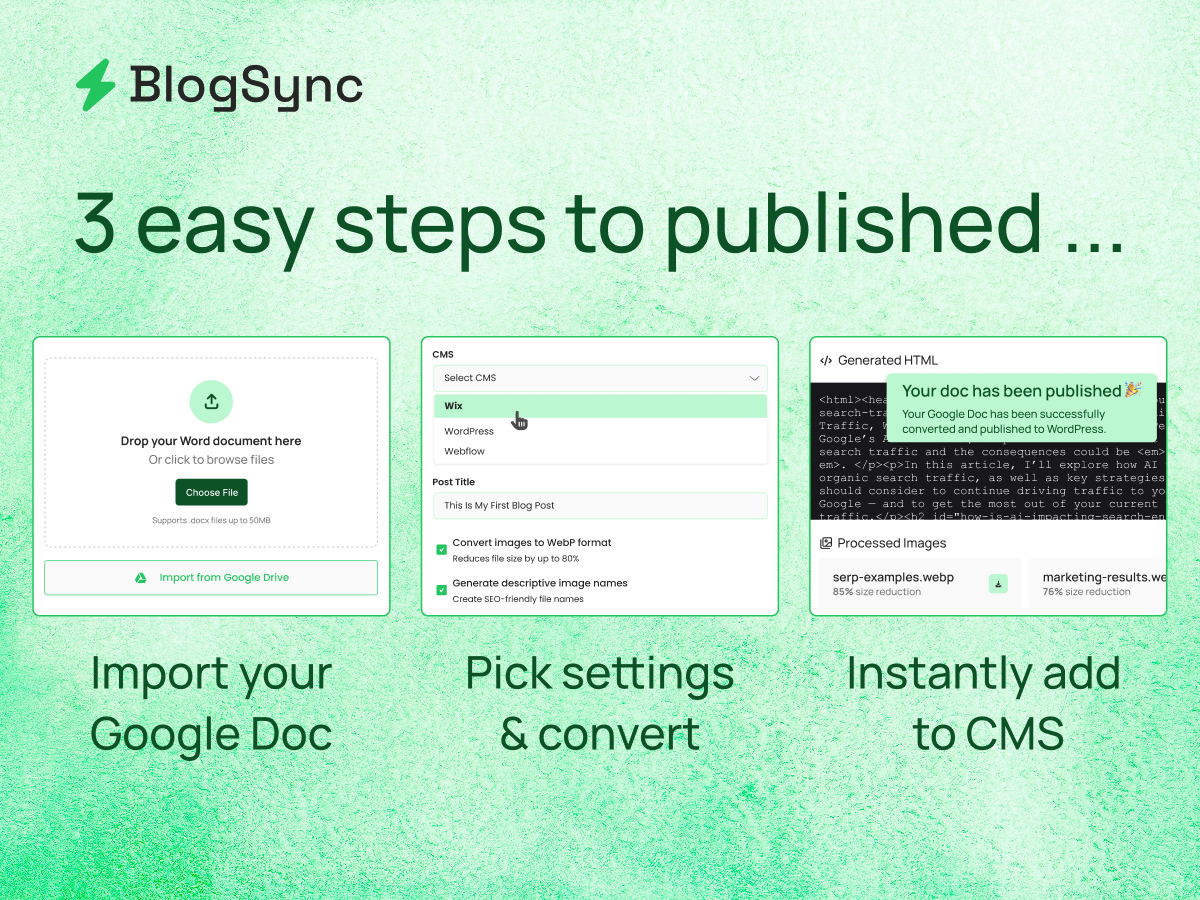
Step 3: Let automation handle formatting and image optimization
This step saves the most time and eliminates the most errors. A good publishing automation tool will produce clean, semantic HTML rather than the bloated output that copy-paste creates.
It will also handle image compression and WebP conversion automatically, generate SEO-friendly filenames using AI, and add descriptive alt text without any manual input.
BlogSync, for example, uses AI-powered image optimization to handle all of this automatically, reducing image file sizes by up to 94% while preserving visual quality, directly addressing one of the biggest contributors to slow page load times. It also uses AI-powered image naming to name images and set alt text based on the context of the image and the content around it.
Step 4: Review, schedule, and publish in one step
The only human touchpoint in this workflow should be a final quality check. Not a formatting session. Not an image-uploading exercise. A quick read-through to confirm everything looks right, followed by scheduling or immediate publishing with a single click in your website CMS.
A note on role-based permissions
One underrated benefit of publishing automation is what it does for your team structure.
Tools that support role-based permissions allow writers and editors to push content to your CMS without needing admin access. The right people can publish without creating security or version-control headaches, and senior team members stop becoming the bottleneck every time a post is ready to go live.
What To Look For In A Content Publishing Automation Tool
Rather than a generic top-ten list, here are the criteria that actually matter when evaluating a document-to-CMS publishing solution. These are the questions most content teams only think to ask after they have already chosen the wrong tool.
The Compounding Value Of Automating Content Publishing
Saving 20 to 30 minutes per article is a real, immediate gain. But the bigger return is harder to see until you’ve actually experienced it.
Publishing bottlenecks suppress overall output
When publishing feels like a chore, teams unconsciously write less. The friction does not just slow down individual posts. It discourages a higher volume in the first place.
Robert Rose, Chief Strategy Advisor at the Content Marketing Institute, has been making this point for years. In a Content 10x interview, he framed it this way:
"The sustainable competitive advantage is the operations, the processes you put in place for your editorial strategy. They are repeatable, they become a habit, so you can create content at scale." - Robert Rose, Chief Strategy Advisor, Content Marketing Institute
Remove the publishing friction, and output tends to naturally increase. Research from Siege Media and Wynter found that 62.8% of content marketers who saw traffic growth between 2024 and 2025 were publishing more consistently.
Consistency is an SEO compounding mechanism
Search engines reward frequency. A team that publishes reliably, week after week, builds audience trust and accumulates industry authority in a way that an inconsistent team simply cannot replicate.
Automation makes that consistency achievable without burning out the people responsible for maintaining it.
Your team's creative energy goes further
When writers and editors are not spending mental energy on formatting details, they can spend it on what they are actually good at: producing great content. That is the real ROI of publishing automation. Not the minutes saved per post, but what gets done with that reclaimed time instead.
Put Your Publishing On Autopilot
If your team is still stuck in the copy-paste loop, BlogSync is worth exploring. It handles the complete document-to-CMS workflow, from Google Docs or Word to WordPress, HubSpot, Webflow, and beyond, with automatic HTML formatting, AI-powered image optimization, and role-based publishing built in for your whole team.
The publishing work is already done. It's time to stop doing it manually.